Open it, press play, and that's it.

Cobalt sorts out Java, Fabric and your mods in the background. No wikis, no hunting for the right version, no broken jars to fix. You just play.
Download Windows 64-bit · Java handled for you
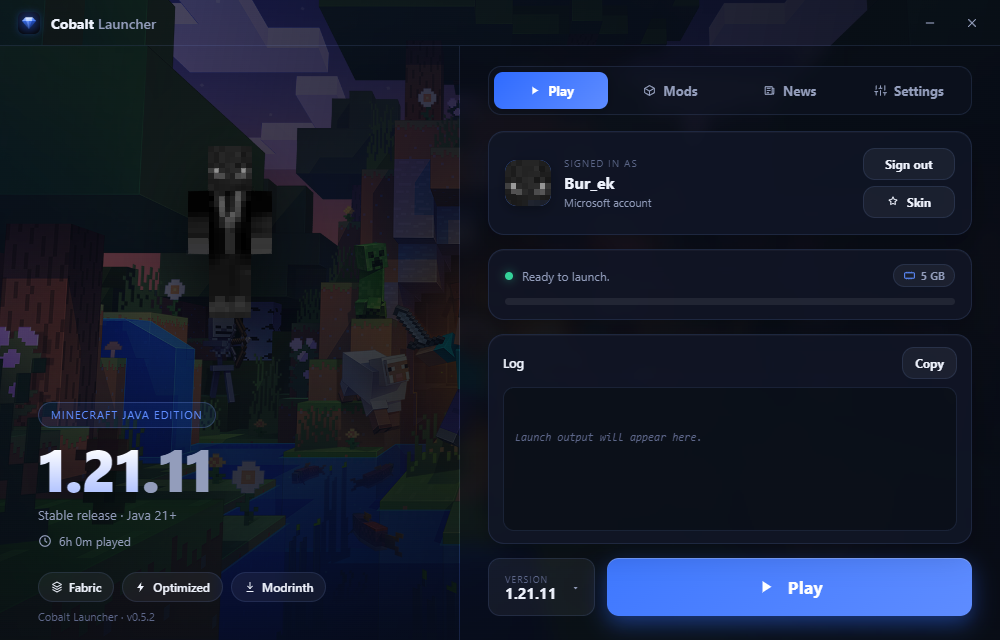
The Cobalt Launcher running
What it does

The boring parts are already handled.

01

Fabric, set up per version

The loader installs itself for whatever version you choose. Want plain vanilla? It's a single toggle in settings.

02

Smooth out of the box

Sodium, Lithium and a couple of memory mods come pre-loaded, so the game runs well the very first time you open it.

03

Modrinth, in the app

Search a mod, install it, switch it off, delete it. No browser tabs, no dragging jars into folders by hand.

04

Your skin in 3D

Your character shows up and waves when you sign in. Drop in a new skin and spin it around before it goes live.

05

Patch notes where you launch

Releases and snapshots land in a News tab, newest first. Open one to read the full changelog without leaving.

06

Updates that keep your game

When a new build ships, a small bar appears. One tap and you're current, while your worlds, mods and login stay put.

Setup

About a minute, start to finish.

01 / install

Run the setup

Pick a folder and let it finish. There's nothing to configure.

02 / sign in

Use your account

Log in with the Microsoft account that owns Java Edition.

03 / play

Hit the button

Choose your desired minecraft version, press play and automatically the launcher gonna download all the Minecraft files after that you can play!

FAQ

Before you install.

Does it collect any of my data?
No. No telemetry, no analytics, no account on our side. Cobalt only talks to Microsoft, Mojang and whichever mod sites you choose. Nothing about you is sent anywhere we could read.
Where does my Microsoft login go?
Straight to Microsoft. The token it hands back is stored only on your own PC, in your Windows user folder. There is no Cobalt server in between, so your account never passes through us.
Is there AI involved?
Partly. AI was used for about half of the build, but the whole client is gone over by hand and tested, so it stays stable instead of throwing bugs at you. Either way it runs entirely on your PC, with nothing sent to an AI while you play.
Do I need to install Java myself?
No. If your Java is missing or too old for 1.21.x, Cobalt grabs the correct one on the first launch and uses it from then on.
Will it touch my existing Minecraft?
It won't. Cobalt keeps its own folder, so your official .minecraft, your worlds and your settings are left exactly where they are.
Is it free? What do I need?
Free. You need a Microsoft account that owns Minecraft: Java Edition and a 64-bit Windows machine.

Grab it and go play.

Windows · keeps itself updated · free Download Cobalt